CMOS - Online member onboarding
The Centralised member onboarding simplified platform (referred to simply as "CMOS") facilitates all online onboarding for new members across various organisations.
This is a new, revised implementation of "CMO", revising the process to reduce the number of steps and fields required while also allowing recurring card payments as a payment method.
CMOS supports the onboarding for individuals based in South Africa (ie: National) and international via the PayFast reucrring card process.
Link Builder
To ease the process of creating a unique sharable link to the CMO platform/process that accepts the relevant referrer, campaign and lead source, use the CMOS Link Builder available the URL - https://sluit-aan.afriforum.co.za/get-link
URLs
AfriForum URL/s
| Environment | URL |
|---|---|
| DEV | https://dev.cmos-afriforum.lonelyviking.dev/ |
| QA | https://qa.cmos-afriforum.lonelyviking.dev/ |
| AfriForum PROD | https://sluit-aan.afriforum.co.za/ |
| AfriForum Teater PROD | sluit-aan.afriforumteater.co.za/ |
| AfriForum Jeug PROD | https://sluit-aan.afriforumjeug.co.za/ |
| AfriForum Sport PROD | https://sluit-aan.afriforumsport.co.za/ |
| AfriForum TV PROD | https://sluit-aan.afriforumtv.co.za/ |
| Adam Tas PROD | https://adamtas.afriforum.co.za/ |
| Bok van Blerk PROD | https://bokvanblerk.afriforum.co.za/ |
| Steve Hofmeyer PROD | https://stevehofmeyr.afriforum.co.za/ |
| Wereld Wyd | https://sluit-aan.wereldwyd.co.za/ |
SAAI URL/s
| Environment | URL |
|---|---|
| DEV | https://dev.cmos-saai.lonelyviking.dev/ |
| QA | https://qa.cmos-saai.lonelyviking.dev/ |
| PROD | https://sluit-aan.saai.org/ |
Query Params
CMOS accomodates various query parameters to facilitate additional functions/features for the onboarding process.
Please note: all query parameters are optional.
| Parameter name | Parameter description | Valid values |
|---|---|---|
| campaign | Specify the campaign name to be included on the new lead creation and ultimately on the new member product | string: _any |
| leadSource | Specify the source to be inclulded in the lead creation | string: _any |
| idNumber | Pre-fill the "ID Number" field on step 1 | string: _any |
| surname | Pre-fill the "Surname" field on step 1 | string: _any |
| name | Pre-fill the "Name" field on step 1 | string: _any |
| mobileNumber | Pre-fill the "Mobile number" field on step 1 | string: _any |
| Pre-fill the "Email" field on step 1 | string: _any | |
| skipLanding | Specify whether the landing page should be skipped and the lead to start on step 1 of the onboarding process instead | string: "true" or "false" |
Agent Callbacks
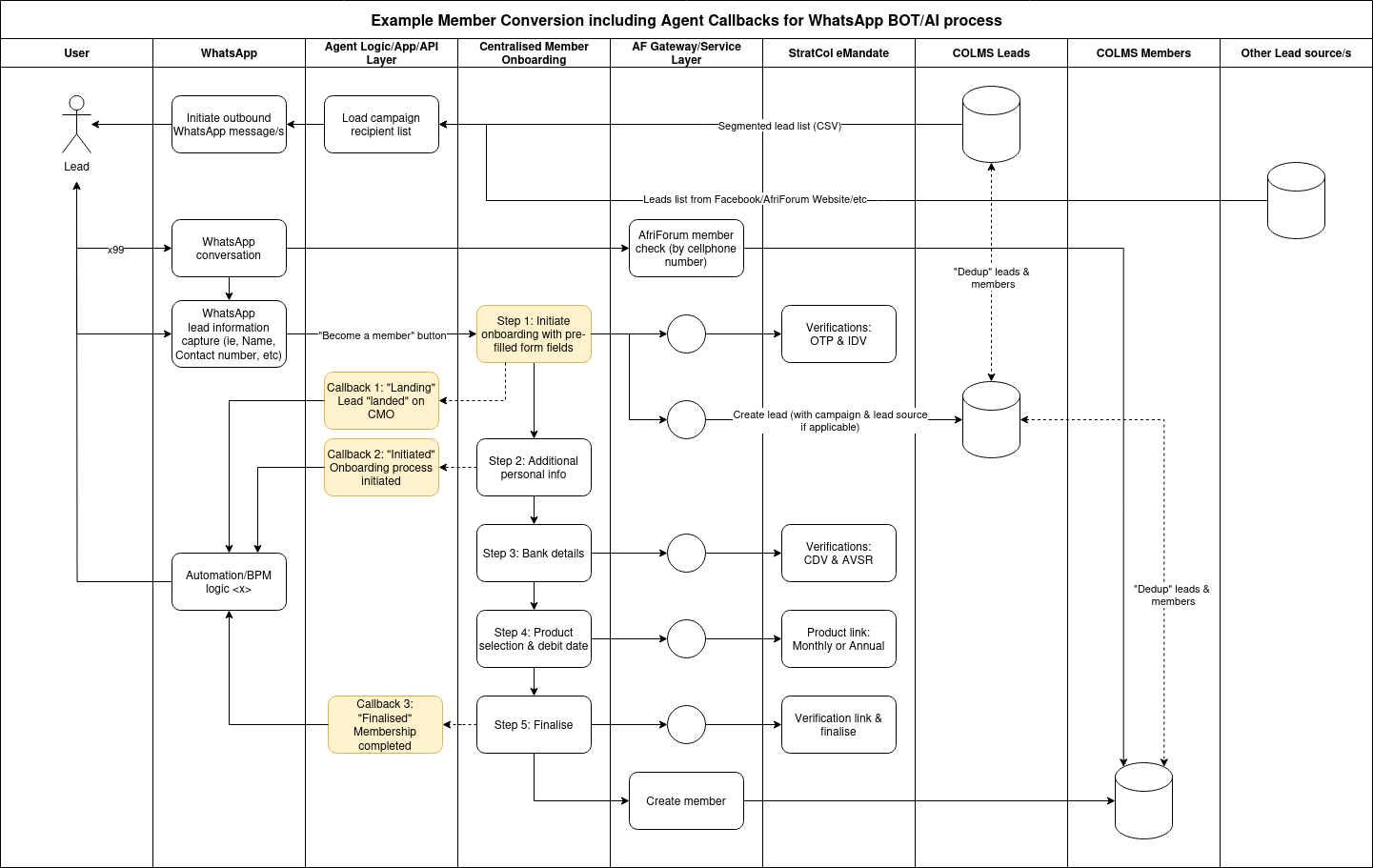
The CMOS platform supports 3 agent callbacks which can be used to track the progress of a onboarding process initiated outside of CMOS.
- "Landing" callback: Sent to the agent endpoint when a lead lands on CMOS.
- "Initiation" callback: Sent to the agent when the CMOS process is initiated.
- "Finalised" callback: Sent to the agent when the CMOS process is completed successfully (ie: the lead has converted).
High level schematic
Configuration
To ensure callbacks are sent to an agent, two things are required.
- A new agent is created on CMOS with 3 URLs set for "Landing", "Initiated" and "Finalised" callbacks (contact support@lonelyviking.com if a new agent set up is required).
- Additional query parameters are included in the CMOS URL containing the unique "Agent ID" configured in step 1 and a unique "Session ID" that identifies the lead
Query Parameters
| Parameter name | Parameter description |
|---|---|
| agentId | The unique Agent UUID configured in step 1 above. |
| sessionId | A unique Session ID included as an identifier for the lead sent to CMOS |
Agents
| Agent name | Agent UUID |
|---|---|
| exah | 590ef0d3-006f-4a5f-939f-1569897fd281 |
| connexai | 85e34d0b-9874-49e1-967c-89fa1e268da1 |